Train simulator


Train simulator |
|
 |
||
Error while installing from APK file!
It is the intention to install activities in train
simulator by a double click on a APK file.
In windows is the file type
wrong installed.
You can solve this problem by:
(Sorry I only have dutch screen shots)
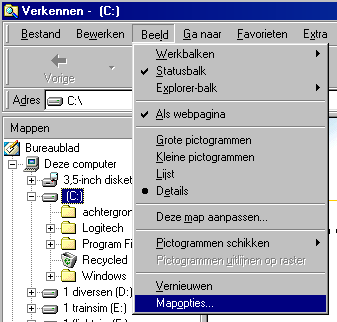
| open the windows explorer. |
||
 |
||
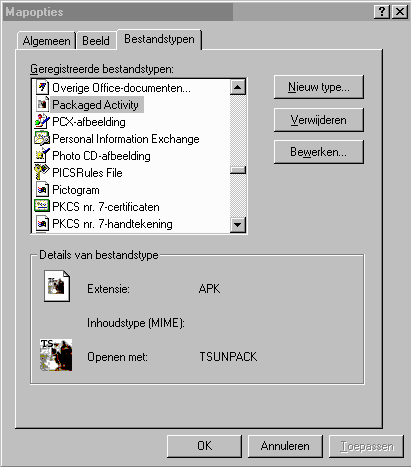
Search for the typ Packaged activity and click once. Click on the edit button. |
||
 |
||
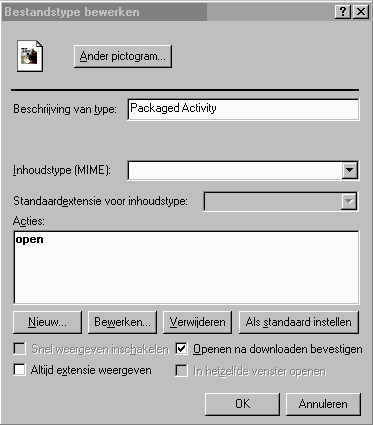
| Click edit once more: |
||
 |
||
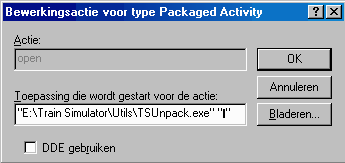
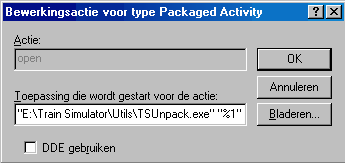
| In the next screen you see a black dash. Replace this dash by the characters: %1 |
||
 |
||
| You should see: |
||
 |
||
| Click three times on the button OK and from now on you can install activities in Train Simulator. |
||